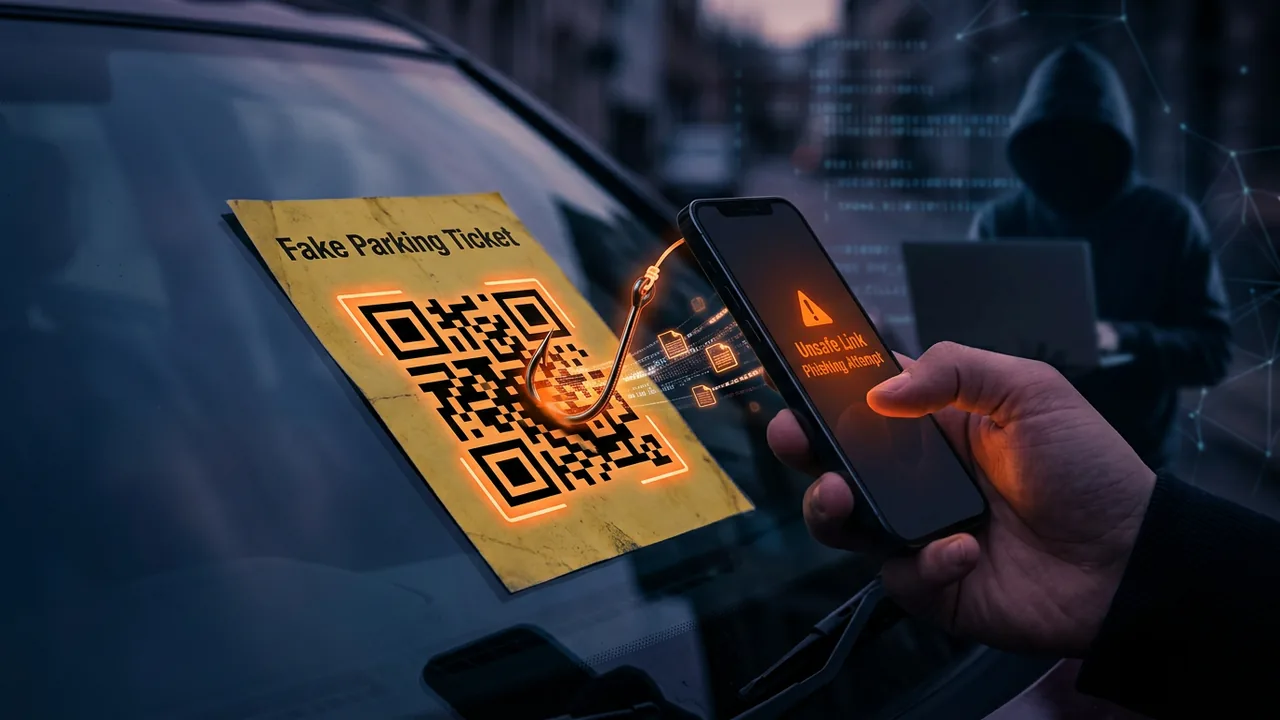
You scan QR code on cafe table to see menu. Or scan QR on fake parking ticket placed on your car windshield. Two seconds later, phone opens site looking like e-wallet and asks login. You just got quished.
Quishing is phishing via QR code. Unit 42 Palo Alto 2024 reported 1,200 percent increase in QR phishing attacks within a year. Because QR cannot be read by human eye, email filters and your eyes are both blind.
This article breaks down evolution of quishing in 2025, modes in Indonesia, and how to scan safely without becoming victim.
Why QR code becomes effective phishing weapon
QR code designed for speed, not security. No origin verification inside QR itself. QR only contains text or link. Your device decides what to do with link.
Three reasons quishing rises.
Email filters blind. Regular phishing uses text links scannable by antivirus. Quishing uses QR image. Email filter sees image, not link. Phishing link hides inside QR pixels, bypasses filter.
Human eye blind. Humans cannot differentiate real and fake QR by looking. QR both black white squares. You must scan first to know content.
Phone directly opens browser without preview. Many phone cameras directly open link after scan without showing full URL. You have no time to check domain.
Combination of three blinds makes quishing effective even for employees already trained against phishing.
Quishing modes happening in Indonesia and globally 2024-2025
1. Fake parking QR and fake ticket QR
Mode viral early 2025 in Jakarta, Surabaya, Bali. Actors place fake QR sticker over real QR of parking machine or on tickets put on car glass.
Victims scan, enter fake parking payment site asking credit card or e-wallet input. Fake site charges and steals card data.
Sign: domain uses similar name but addition like bayar-parkir-jakarta.shop not jakarta.go.id, no valid HTTPS with institution name, and asks card data not QRIS.
2. Invoice and HR docs with QR verification
Attack on small business employees and corporate. Email from boss or HR with subject "Payslip" or "Invoice PT XYZ" containing PDF. Inside PDF there is QR code with text "Scan to verify document" or "Scan to see full file".
When employee scans using phone, link opens fake Microsoft 365 login page. Because employee already logged Microsoft on phone, fake page asks password again and 2FA code.
Proofpoint 2024 report: 10 percent phishing emails in Q3 used QR as primary vector. Number rises from 1 percent year before.
3. QR on restaurant tables overwritten by sticker
Mode in cafes and restaurants. Original QR on table for menu replaced by actor sticker QR. Victim scans menu, instead downloads APK "Menu.apk" which is malware.
This APK fake mode similar to fake APK scam already discussed, but vector is QR, not chat link.
4. QR for free WiFi trapping phishing portal
QR in airport, hotel, cafe saying "Scan for Free WiFi". After scan, victim enters fake captive portal asking Facebook or Google login. Credentials stolen.
Real WiFi usually does not ask social media login, only agree terms or room input.
5. Donation and charity fake QR
During disaster, actors spread donation fake QR posters in WhatsApp groups. QR goes to actor e-wallet, not official donation. Donors cannot trace because QRIS e-wallet does not show big organization name.
How quishing works technically
Attack flow simple but effective.
- Actor creates phishing site mimicking Microsoft, Google, or e-wallet login. Domain uses
microsoft-login-security.comorg00gle.com. - Actor generates QR code from phishing link using free QR generator tool.
- Actor sends QR via email as image, or prints sticker for physical placement.
- Victim scans using phone camera. Camera opens browser to phishing link.
- Victim fills credentials, actor gets password plus 2FA token if phishing page uses adversary-in-the-middle proxy like Evilginx.
Advanced version uses dynamic QR. Static QR contains direct link, dynamic QR contains shortener link redirecting to changing phishing links to avoid blocking. If one link blocked, actor changes redirect in shortener without changing printed QR.
There is also QR not using link at all, but using command WIFI:T:WPA;S:FakeWiFi;P:password;; to force phone join malicious WiFi, or mailto: to send email to actor.
Why filters and antivirus often fail
Email gateways like Microsoft Defender and Google detect phishing links by checking domain and reputation. QR code stores domain inside image, so gateway must OCR QR first to get link, then check reputation. Many gateways do not do real-time OCR because CPU load.
Also actors use legit QR generator services like qr-code-generator.com. Initial QR link is legit shortener domain, not phishing domain. Gateway sees legit domain, lets pass. After pass, shortener redirects to phishing domain.
On physical side, no filter. QR sticker on parking machine has no antivirus. Only defense is your eyes and habit.
10-second checklist before scanning any QR
Keep this checklist on phone.
- Look at physical QR. Is sticker placed over original QR? Any glue residue or double QR? Official QR usually printed neatly, not thin paper sticker placed crooked.
- Check context. Does it make sense QR exists there? Official Jakarta ticket uses QRIS or QR with official logo, not link to .shop.
- Use scanner showing URL first. Do not use camera that directly opens link. Use Google Lens or iPhone built-in scanner showing preview link. Read domain before tap Open.
- Check domain. If preview shows
parkir-jakarta-pay.sitenotjakarta.go.id, do not open. If asking credit card input to pay parking Rp 5000, suspicious. - Do not input credentials after scanning unknown QR. Restaurant menu QR does not need Google login. Parking QR does not need e-wallet password, only QRIS.
- Turn off auto-open QR in camera. On iPhone Settings > Camera > turn off Scan QR code auto open if you want control. On Android, use Lens for preview.
- If QR from office email, verify via other channel. Email from HR with QR verification for payslip but sender Gmail address, not company domain, odd. Chat HR via Slack for confirmation.
10-second check saves hours cleaning after phished account.
How to safely scan QR on Android and iPhone
iPhone:
- Open Camera, point to QR. iPhone shows yellow pop-up with link. Tap and hold pop-up to see full URL preview, not directly tap Open.
- Alternative: use Live Text in Control Center > Code Scanner showing URL clearer.
- Turn off auto-follow in Settings > Safari > turn off Open Links if you want to check first.
Android:
- Use Google Lens, not direct camera. Open Lens, scan QR, Lens shows link plus security info if phishing detected.
- In Chrome, enable Safe Browsing Enhanced Protection: Settings > Privacy and security > Safe Browsing > Enhanced. Feature checks QR link real-time with Google.
- If you use Samsung, Samsung Internet built-in scanner has phishing warning.
Additional tips:
- Do not download APK via QR. Restaurant menu should open website, not ask to download APK.
- If QR asks permission for camera, microphone, or contacts after scan, deny. Legit site does not need that permission.
What shops, cafes, small business should do to prevent QR replaced by actors
If you own cafe with QR menu on table, you also responsible to keep QR not replaced.
- Print QR on hard-to-replace material. Use acrylic or frame, not paper sticker easily re-stickered.
- Add logo and branded frame. QR with center logo and cafe color frame harder to mimic by actor using plain black white QR.
- Check QR every morning. Opening SOP must check all table QR still original and test scan to official website.
- Use own dynamic QR, not static. Dynamic QR via services like QR Code Generator Pro with your own domain can be changed destination without reprinting, and you can monitor how many times scanned plus location. If scans spike from foreign country, your QR may have been spread on phishing forum.
- Educate cashier. Cashier must know sticker overwriting mode and must report if seeing suspicious person near QR.
Real example: cafe chain in Bali hit quishing because actor placed fake QR stickers on 10 tables. One customer got card data stolen and reported on Google Review. Cafe reputation down. Solution cafe replaced all QR to acrylic with logo.
How to report and handle if already scanned dangerous QR
You already scanned and filled password.
- Disconnect phone internet, activate airplane mode to stop active session.
- From other safe device, change password of account you filled on fake page.
- Logout all sessions: Google myaccount.google.com > Security > Your devices > Sign out all. Microsoft account.microsoft.com > Security > Sign out everywhere.
- Enable 2FA with authenticator app if not yet.
- Scan phone with Play Protect or antivirus. If you downloaded APK from QR, delete APK and scan.
- Report phishing link to Google Safe Browsing https://safebrowsing.google.com/safebrowsing/report_phish/ and to patrolisiber.id with screenshot QR and URL evidence.
- If you input credit card data, contact bank to block card and request new card.
Do not try revenge scan back actor QR with weird tool. Focus on recovery.
Policy for small offices and schools
Make 1-page rule:
- Prohibited sending internal docs via QR without sender verification via second chat.
- HR email will never ask scanning QR for salary verification or password.
- All QR in office must have office branding.
- Employees must use scanner showing preview URL, prohibited auto-open.
15-minute training each quarter with quishing simulation raises awareness. Send simulation email containing QR to training page, see how many employees scan without checking. Non-punitive education more effective than warning.
Sources and further reading
- Unit42 Palo Alto: QR Code Phishing Surge 2024
- Proofpoint: QR Code Threat Landscape Q3 2024
- FBI IC3: QR Code Scams Advisory
- CISA: Avoiding Social Engineering and Phishing
- Google Safe Browsing: Report Phishing
Editorial note: QR code not enemy. QR greatly helps small business. Risk exists in implementation without verification. Use QR with branding and URL preview to protect customers.
Frequently asked questions
Are all QR dangerous?
No. QR from official source and with clear domain preview safe. Risk rises if QR placed randomly or from unknown email.
How to visually differentiate real and fake QR?
Almost impossible without scan. That is why check physical sticker, context, and use scanner showing URL.
Can antivirus detect QR phishing?
Some can if scanner uses Safe Browsing. Built-in camera without Safe Browsing does not detect. Use Google Lens or Chrome with Enhanced Protection safer.
Why actors use QR not direct link?
Because QR bypasses email filter and cannot be read by human eye. Direct phishing link easily blocked by filter.
Can QRIS be quished?
Yes. Actor replaces real shop QRIS with personal QRIS. Payment goes to actor. Check merchant name in e-wallet app before confirming payment.
How to safely create QR for my shop?
Use generator with logo and custom domain, print on acrylic, check daily, and use dynamic QR so you can change destination without reprinting.
Must I stop using QR?
No. QR still practical. Just use scanner showing preview URL and do not input password after scanning public QR.
Does dynamic QR increase risk?
Dynamic QR itself not risky if you control shortener service. Risk arises when attacker controls redirect. Use reputable QR service with your own domain.
Case study: Bali cafe hit by quishing and Google review dropped
Cafe in Ubud used QR menu codes on 20 tables, printed on laminated paper. Actor placed fake QR stickers on 10 tables at midnight. Fake QR went to website menu-cafe-ubud.site asking Instagram login to see menu.
A German tourist scanned, entered Instagram, account taken over. Tourist wrote 1-star Google review: "Their menu QR hacked my Instagram". Cafe rating dropped from 4.6 to 4.2 within a week.
Owner replaced all QR with acrylic with logo, added branded frame, and SOP to check QR every opening. Owner also switched to dynamic QR with own domain menu.cafeubudbali.com so can monitor scans.
After 1 month, no more reports and rating recovered.
Lesson: acrylic cost $1.5 per table cheaper than losing customers and reputation.
90-day roadmap for small business with QR
Week 1: Audit all QR in shop, replace thin paper with acrylic branded logo, make list official QR in sheet.
Week 2: Setup dynamic QR with own domain via QR Code Generator Pro, enable scan tracking for anomaly detection.
Week 3-4: Train employees how to check QR every morning and how to identify fake sticker, plus education how to use scanner showing URL.
Month 2: Put small sign on table: "Our official QR only domain cafeubudbali.com, do not login Instagram to see menu". Educate customers.
Month 3: Simulate quishing attack, place dummy fake QR and see how many employees detect. Evaluate SOP.
Roadmap keeps QR practical but safe.
Mistakes making quishing keep succeeding
Using static QR from free generator without logo and without monitoring. Actor easy to copy and you do not know QR already spread on forum.
Not checking physical QR daily. Fake QR can stay weeks unnoticed until victim reports.
Scanner auto-open without URL preview. Employees and customers directly open link without checking domain.
Asking social media login after scanning menu or parking QR. Practice teaches customers to get used to inputting password after scan, so when fake QR asks login, they treat as normal.
Sharing internal QR via WhatsApp without verification. Employee forwards fake invoice QR to finance group and all scan.
Not reporting fake QR to Google Safe Browsing. Phishing link stays active and eats new victims.
Additional FAQ and advanced mitigation
Many ask whether solutions are free. Most are free, some need small fee. Firefox Relay free 5 aliases, SimpleLogin free 15, iCloud Hide My Email needs iCloud+ $0.99. For small business, €30 per year for custom domain worth time saved.
Does this hold against advanced attacks? No solution 100 percent. But alias, passkey, IoT isolation reduce 80 percent opportunistic attacks that become majority of small business incidents. Targeted APT attacks need deeper defense.
How if employees refuse new SOP? Education with real examples more effective than force. Show case of Bali cafe rating dropping because fake QR, or Jogja boarding house CCTV video leak. Real cases make people care.
Do you need expensive consultant? For small business with customer data under 10k, 1-page SOP plus monthly checklist enough. Consultant needed if you manage sensitive data like national ID, ID photo, or big financial data and need DPIA per PDP law.
How to measure success? Count simple metrics: spam per week, failed login attempts, number IoT devices updated. Note in sheet monthly. If numbers go down, SOP works.
One principle: security not one-time project, but monthly habit 10-30 minutes. Consistency more important than expensive tools.